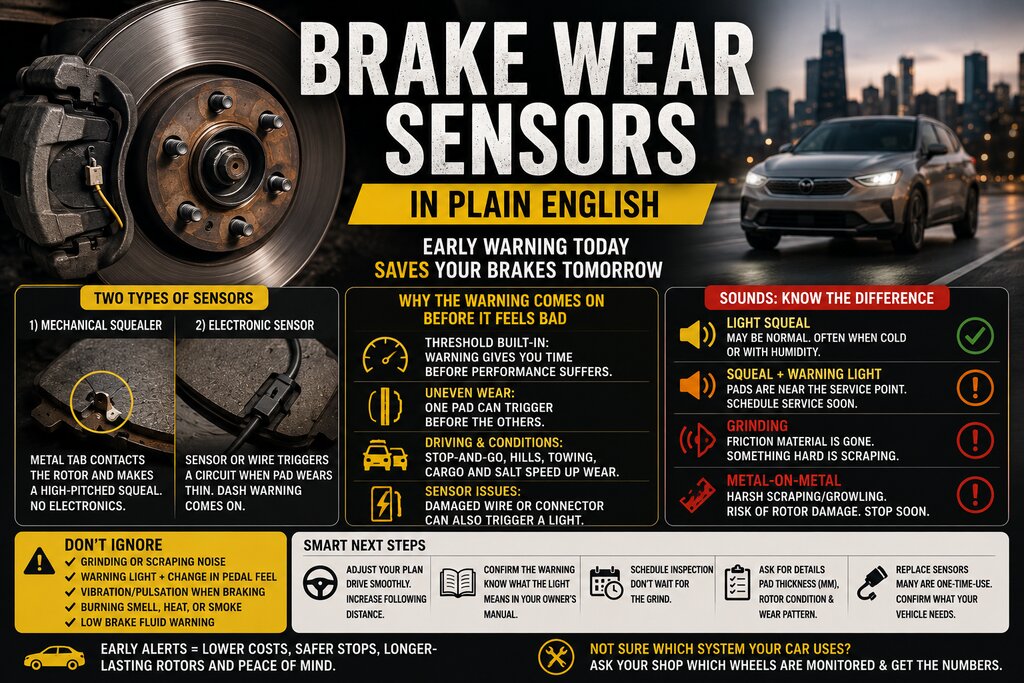
Brake wear sensors, in plain English
I’m Brian O’Connor, based in Chicago, with an engineering background in automotive design. I spend a lot of time explaining car tech to people who like the details but still want the bottom line. Brake wear sensors are a perfect example: the concept is simple, the execution varies by brand, and the warning light tends to show up at the least convenient time.
Verified fact: most modern cars use disc brakes at least up front, and many use disc brakes at all four corners. A disc brake’s friction material (the pad) wears down as you stop. Brake wear sensors exist to tell you when that pad is getting low, before you hit the point where braking performance and rotor health start going downhill fast.
There are two common types of “sensors” you’ll run into:
1) Mechanical squealers (no electronics): A small metal tab attached to the brake pad backing plate. When the pad gets thin, that tab contacts the rotor and makes a high pitched squeal during wheel rotation. It is intentionally annoying.
2) Electronic wear sensors: A small sensor or wire embedded in or clipped to the pad. When the pad wears to a certain thickness, it completes or breaks an electrical circuit. The car’s computer sees that change and turns on a warning in the cluster (often “Brake Pads” or a general brake warning message).
Both systems are widely used across the industry. Some vehicles use only mechanical squealers, some use electronic sensors on one axle (often front), and some use electronic sensors on multiple corners depending on model and market. The exact layout is manufacturer-specific, so if your owner’s manual or service info doesn’t clearly say which wheels are monitored, it is normal to be unsure.
Why the warning pops up when your brakes still feel “fine”
This is where drivers get skeptical. You press the pedal, the car stops, nothing feels scary, so why is the dash yelling at you?
Brake pads can be close to worn out while still delivering decent everyday stopping power in typical commuting. The warning is about remaining material thickness, not necessarily immediate failure. In engineering terms, it is an early alert so you can plan service before you get into rotor damage territory or find yourself metal-to-metal on a rainy Tuesday night.
Also, brake feel is influenced by more than pad thickness: tire grip, brake fluid condition, caliper operation, and even how aggressively your brake booster assists can mask what is happening at the pad surface. Many modern vehicles have strong brake assist tuning that keeps pedal effort consistent even as components age.
A few common reasons a warning appears “early,” even if you are not hearing anything yet:
Normal threshold behavior: Electronic sensors often trigger with some usable pad material left. That buffer exists so you have time to schedule service.
Uneven wear: Pads rarely wear perfectly evenly side-to-side or inner-to-outer. It is common for inner pads to wear faster on some designs because of caliper slide pin condition or piston dynamics. If only one pad reaches the sensor first, you get a warning even though other pads look “okay.”
Driving environment: Stop-and-go traffic around Chicago, hills, towing, heavy cargo, and short trips can accelerate wear. Brake dust and road salt do not help either.
Sensor issues: The sensor wiring can be damaged by road debris or improper routing after prior service. That can trigger a light even if pads are not at the limit. This is real, but it should be confirmed by inspection rather than guessed.
The sounds: squeal vs grind vs “metal-on-metal”
If you remember one thing from this article: warnings and sounds are different signals. Learn what each one usually means.
1) Light squeal when braking (especially gentle stops): This can be normal. Many pads squeak a bit when cold or when humidity changes. Performance-oriented pads can be noisier by nature because of their friction compounds. That said, if it is a consistent high-pitched squeal that comes and goes with wheel speed, it may be a mechanical wear indicator contacting the rotor.
2) Squeal plus a brake pad warning message: Now I’m paying attention. That combination often means you are near the designed service point for pads (and possibly rotors depending on thickness and condition). The car is giving you both an electronic alert and an audible hint.
3) Grinding that gets worse quickly: Grinding is not “just noisy brakes.” Grinding often means friction material is gone and something hard is contacting something expensive. In many cases that hard thing is the pad backing plate scraping against the rotor face.
4) What ‘metal-on-metal’ typically sounds like: It is rarely subtle. Think harsh scraping or growling that follows wheel rotation and gets louder under braking load. Sometimes there’s also vibration through the pedal or steering wheel because the rotor surface gets gouged and uneven. If you have ever heard two pieces of steel dragged across each other in a garage, it is closer to that than to a squeak.
I’ll add one nuance: not every grind is pads-to-rotor backing plate contact. A small stone trapped between rotor and dust shield can also create a nasty scraping sound. But you do not want to assume “it’s just a pebble” without checking because true metal-on-metal damage escalates fast.
A quick reality check: what your car might actually be monitoring
This part trips people up because dashboards look authoritative even when they are only seeing part of the picture.
Verified fact: many electronic wear sensor setups only monitor one pad per axle (sometimes even one wheel position). If that monitored pad hits its threshold first, you get a warning that implies all pads are low even though only one corner has reached the trigger point.
If your vehicle has mechanical squealers instead of electronic sensors, you may never see a dedicated “pad wear” message at all. You might just hear noise first.
If data about your specific model’s sensor layout is missing from your manual or unclear in your infotainment menus, be honest with yourself about uncertainty. The safe move is an inspection rather than guessing which wheels have sensors.
The ‘do not ignore’ list
I’m not trying to scare anyone; brakes are service items and warnings are normal over a car’s life. But there are situations where delaying becomes expensive or unsafe.
Do not ignore:
A grinding or scraping noise under braking, especially if it appeared suddenly or gets worse over days.
A brake warning light paired with a change in pedal feel, like extra travel, sponginess, or needing more force than usual.
Pulsation or steering wheel shake while braking. This can indicate rotor thickness variation or other issues that deserve prompt attention.
A burning smell after normal driving, smoke near a wheel, or one wheel that feels unusually hot compared with others after a short trip (careful here). This can indicate dragging brakes or a stuck caliper situation.
The parking brake warning light behaving oddly, especially on vehicles with electronic parking brakes where rear caliper function and parking brake actuation are linked in software.
A low brake fluid warning. Verified fact: as pads wear, caliper pistons extend further and fluid level in the reservoir can drop slightly. Low fluid can also mean an actual leak; both require attention quickly.
Safe next steps when the warning comes on
No detailed DIY procedures here, but you can still handle this like a pro without touching a wrench.
1) Change your driving plan for the day. If you have grinding noises or any change in braking performance, avoid highway speeds if possible and increase following distance dramatically. Smooth inputs reduce heat and stress on already compromised parts.
2) Confirm what warning you actually have. A “brake pad” message is different from ABS warnings or red brake system warnings. Red brake warnings generally indicate higher urgency than amber maintenance-style alerts (this varies by manufacturer). If your manual explains indicator colors for your model year, follow it.
3) Schedule an inspection soon, not “sometime.” If it is just an early pad wear alert with no noise and normal feel, many drivers have some runway left. But waiting until it grinds often turns a pad job into rotors plus possibly calipers depending on damage.
4) Ask for specifics when you get an estimate. You want remaining pad thickness measurements (in millimeters), rotor condition notes (scoring, heat spots), and whether wear was even across inner and outer pads. Those details help you understand whether this was normal wear or something like sticking slide pins causing one side to burn through early.
5) If your car uses electronic sensors, ask whether new sensors are included. Verified fact: many electronic wear sensors are designed as one-time-use components because once they contact the rotor or once their circuit state changes at end-of-life, they are replaced with new pads (depending on design). Some shops reuse them if they are intact and not triggered; others replace as standard practice based on manufacturer guidance. Either approach should be justified clearly for your specific setup.
A few common misunderstandings I hear at shops around Chicago
“My brakes were done recently so this light must be wrong.” Possible but not guaranteed. If only front pads were replaced last time and rears were left alone (or vice versa), your remaining axle could now be at the sensor point. Also possible: sensor wire damage during service or corrosion at connectors in salty climates.
“I’ll just drive until it starts making noise.” That strategy works better on older cars with simple squealers if you accept some risk and cost variability. On modern setups with electronic warnings, ignoring them often means skipping past the planned maintenance window straight into rotor damage territory.
“Metal-on-metal just means it’ll stop worse.” It also means heat management gets worse and stopping distances can become inconsistent depending on speed and temperature. Plus rotors can get deeply scored quickly once backing plates start cutting into them.
If you drive something heavy or fast, take warnings more seriously
No need to name-drop every model under the sun to make this point: vehicle mass and duty cycle matter. A three-row SUV hauling family gear around suburbia asks more from its brakes than a small sedan doing light commuting. Trucks towing near their rated limits generate more heat during repeated stops than most people expect (even though tow ratings themselves vary widely by model year and configuration).
If you drive a performance car or just drive enthusiastically on back roads now and then, pad compound choice matters too. Some high-friction pads trade quiet operation for bite at temperature; some street-focused pads prioritize low noise and dust but may fade sooner when pushed hard downhill. Those aren’t defects so much as design tradeoffs.
The money part: why catching it early usually saves you cash
This is where my engineering brain meets real-world ownership reality. Brake systems are designed around sacrificial friction materials (pads) protecting more expensive components (rotors and calipers). Once pads are gone, rotors become the sacrificial part instead.
If you respond to an early warning promptly, odds improve that rotors can remain within spec depending on thickness and condition (shops measure this). If you wait for grinding noises for weeks, rotors often end up scored beyond what’s acceptable for continued use. At that point replacement becomes more likely than resurfacing (and resurfacing practices vary by shop equipment and rotor design).
A quick checklist for interpreting what you’re hearing
Squeak only when cold or after rain: Often normal surface rust cleanup on rotors; monitor it.
Squeal that tracks wheel speed even when barely braking: Could be a wear indicator tab; get pads checked soon.
Squeal plus dash warning: Plan service now; do not wait for grinding.
Loud scrape or grind under braking: Treat as urgent; minimize driving until inspected.
The takeaway I give friends: brakes don’t fail politely
Your car usually gives hints before things get ugly: an amber message here, an annoying squeal there, maybe slightly longer pedal travel over time that’s easy to rationalize away because life is busy.
If your brake wear warning pops up but everything feels normal, that’s actually good news. It means you caught it in the planned window where service is straightforward and predictable. If you’re hearing harsh scraping that sounds like metal being dragged across metal, do yourself a favor and stop treating it as background noise. That sound is often your rotors getting carved up in real time.
If you’re unsure which system your vehicle uses or which wheels are monitored, say so when you book service and ask for measured pad thickness at each corner. Clear numbers beat guesswork every time.
0 comments
Join the discussion around this article.
Please login to comment.